Saving YouTube videos offline still matters in 2026—mainly because users want options that match their habits. The choice boils down to browser-based online downloaders versus native Android apps. Each has clear pros and cons depending on how often you download and what device you use.
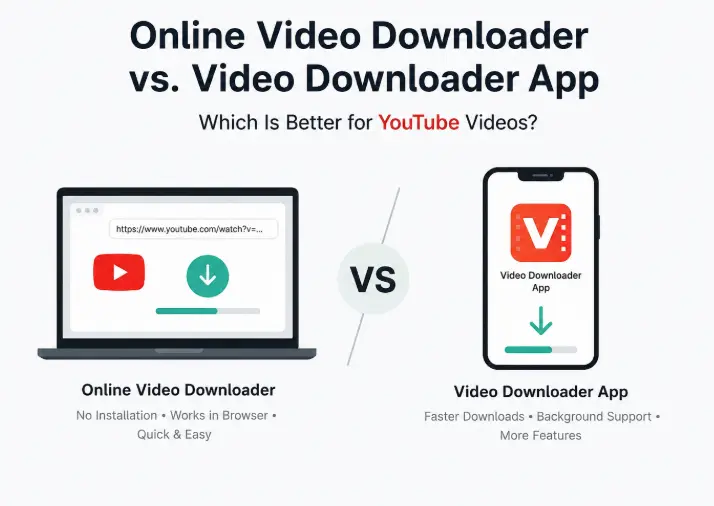
- Online downloaders like VidsSave support 40+ platforms without installation.
- Android apps like VidMate offer faster, multi-threaded, background downloads.
- Online tools are zero-setup but limited by browser constraints.
- Apps require APK installs and permissions but suit heavy users better.
Flagship Power, Mid-range Compromises
Online video downloaders are web services accessed through your browser. No installation, no permissions, just paste a link and grab the video. This convenience means they work across all devices—Android, iPhone, Windows, Mac, tablets. They don’t hog storage or run background processes. However, they’re stuck with browser limitations: single downloads at a time, no background downloading, and potential interruptions if the tab closes or the phone locks.
VidsSave exemplifies this category. It supports YouTube plus Instagram, TikTok, Facebook, Twitter/X, Pinterest, Vimeo, and many others. It can download MP4, convert to MP3, and handle up to 4K resolution. A nifty shortcut lets users insert “vids” before “YouTube” in URLs for quick access. On paper, this sounds great, but expect slower downloads and no multitasking.
Setup Hassle But Wins in Speed and Features
Video downloader apps like VidMate require a manual APK install since they often don’t appear on Google Play. This means enabling “Install from Unknown Sources”—a security trade-off. Once installed, these apps run directly on Android, leveraging the device’s processor and memory. The catch is simple: multi-threaded downloading speeds up transfers, especially for 4K videos and batch jobs.
VidMate supports over 1,000 sites, offers MP3 extraction at 256kbps, and crucially, allows background downloads. You can close the app, lock your phone, or use other apps without killing the download. The trade-off is storage space usage and occasional manual updates when platform APIs change.
One Size Doesn’t Fit All: Usage Matters
Online tools win for quick, occasional downloads—no setup, no storage hit, and cross-device flexibility. Handy for shared phones or when you just need a video once in a while. But if you’re downloading daily or want the fastest speeds with background support, a dedicated app is the only way to go.
Privacy and security are worth considering. Online tools run sandboxed in browsers and rarely ask for accounts. Apps demand installation permissions and APKs can be risky if sourced unofficially. Stick to official developer sites for safer installs.
Three Hours to Full Charge? That’s the Trade-off
Don’t expect miracles on battery life or speed. Online downloaders rely on browsers that can pause or stop downloads if the screen locks. Apps drain more battery but keep downloads alive. Real-world usage with 5G and high screen brightness will likely reduce battery life faster than brand claims suggest.
Storage is another factor. Apps take up space beyond the video files themselves. Online tools only store what you download, making them better for older phones with limited space.
GizmoIndo’s Take
The battle between online YouTube downloaders and Android apps in 2026 is about trade-offs, not outright winners. Online tools like VidsSave are quick and lightweight but hit a wall on speed and multitasking. Dedicated apps like VidMate require more effort to set up and some security caution but deliver tangible benefits for serious users.
For casual users, online downloaders remain the sensible choice—no fuss, no risks. For anyone who downloads regularly, especially on Android, investing time to install and maintain a downloader app pays off in faster transfers and background support. Expect no miracles on battery or storage, but at least you get control.
Ultimately, many users will juggle both: online tools for quick grabs on any device, apps for heavy lifting on Android. Knowing when to use which is the key to avoiding frustration and wasted time.
(Via)