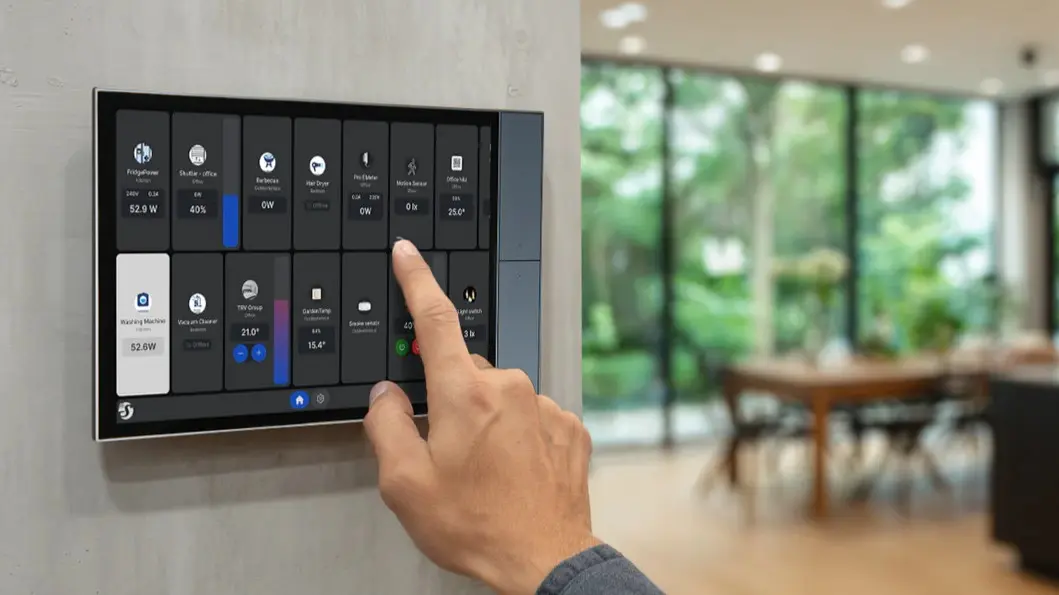
Smart home control panels offer a way to manage connected devices without always reaching for a smartphone. Shelly’s Wall Displays are popular for this reason, acting as a fixed control center for lighting, sockets, heating, and more. However, until now, users could only customize a single dashboard, limiting flexibility for different household needs.
- Shelly’s new beta software adds support for multiple dashboards.
- Depending on the model, up to five dashboards can be saved and switched between.
- Only the X2, X2i, and XL models currently support this feature.
- The XL model costs around $350 and offers the most dashboard options.
Multiple Dashboards Aim to Simplify Complex Smart Homes
The updated Shelly Wall Display software (version 2.7.0 beta) introduces the ability to save and toggle between several dashboards. This means different family members or use cases can have dedicated control screens. For example, one dashboard might focus on lighting and sockets, while another handles heating and air conditioning.
This feature can help maintain tidy interfaces, which is valuable because previous reports noted slow response times, particularly when integrated with Home Assistant. Having multiple focused dashboards could reduce clutter and improve responsiveness.
Hardware Limits Define Who Can Benefit
Not all Shelly Wall Displays can take advantage of this update. The X2 and X2i models support up to three dashboards, while the XL model supports up to five. Other models don’t currently have this capability due to hardware restrictions.
The XL model, priced around $350, is the top choice for users wanting maximum flexibility. Its ability to house multiple dashboards makes it better suited for larger or more complex smart home setups.
Consider Beta Risks and Availability
The multi-dashboard feature is available now in beta form. Users can try it by updating their Wall Display firmware but should note that reverting to the previous stable version (2.6.2) is not possible once updated. This trade-off means those who prefer stability might want to wait for the final release.
Availability and pricing vary by region, so buyers should check local options before deciding. The update signals Shelly’s ongoing commitment to smart home usability, even as some competitors scale back their efforts.
Is Shelly’s Multi-Dashboard Update Right for You?
Consider this update if you need a fixed smart home control panel that can adapt to multiple users or scenarios without depending on smartphones. The multi-dashboard support helps keep controls organized and may improve responsiveness by focusing on relevant widgets.
Skip it if your current setup is simple or you prefer to avoid beta software risks. Also, if you own a model other than X2, X2i, or XL, this feature won’t be available yet.
Overall, this update enhances Shelly’s Wall Displays as practical smart home hubs, especially for users who value clarity and customization in their home automation interfaces.
(Via)